In today’s fast-paced world, managing numerous documents with varying expiration dates can be overwhelming. The Excel Document Expiration Template is your go-to solution for staying organized and ensuring no critical document expiration goes unnoticed. Whether you’re handling personal paperwork or managing business contracts, this tool can save you from costly oversights.
Why You Need an Expiration Tracking System
The importance of tracking document expiry dates cannot be overstated. Missing deadlines can lead to:
- Financial Penalties: Late renewals might incur fines.
- Operational Disruptions: Expired documents can halt processes.
- Legal Issues: Certain industries require up-to-date documentation by law.
Implementing a system like the Excel Document Expiration Template is not just a safeguard; it’s a strategic advantage.
Common Challenges in Document Management
Managing document expirations involves several challenges:
- Volume of Documents: Keeping track of numerous files is tedious.
- Date Calculations: Manually calculating expiration dates increases errors.
- Notification Systems: Forgetting renewal dates is common without reminders.
The Solution: Excel Document Expiration Template
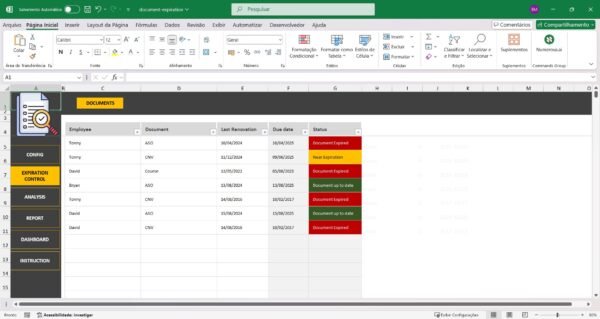
The Excel Document Expiration Template from SheetsTech is crafted to simplify your document management. Here’s how it can transform your workflow:
- Automated Alerts: Receive notifications before documents expire.
- Centralized Data: All expiration dates in one place for easy access.
- Customizable Fields: Tailor the template to fit your specific needs.
Explore the complete tool and discover how it can enhance your document handling process.
How to Use the Excel Document Expiration Template
- Input Document Details: Enter the document name, type, and expiration date.
- Set Notification Preferences: Choose when and how to receive alerts.
- Monitor and Update: Regularly check and update your records as necessary.
With the downloadable spreadsheet, you gain control over your document lifecycle management.

Benefits of Using the Excel Document Expiration Template
- Ease of Use: User-friendly interface for quick setup.
- Time-Saving: Reduces the time spent on manual tracking.
- Reliability: Decreases risk of human error.
FAQ
Q: Can the template handle multiple document types?
Yes, it can track various document types and expiration dates simultaneously.
Q: Is it compatible with all Excel versions?
The template is designed to work with all major Excel versions.
Q: How often should I update the template?
Regular updates are essential whenever new documents are added or changes occur.
Conclusion
Don’t let document management overwhelm you. The Excel Document Expiration Template is your ultimate solution for efficient and error-free tracking. Take control of your document expirations today by incorporating this tool into your routine.
See Also
Boost your results with these other tools:
- ABC Curve Excel Spreadsheet Template
- Financial Indicators Excel Spreadsheet Template
- Fitness Center Management Excel Spreadsheet Template