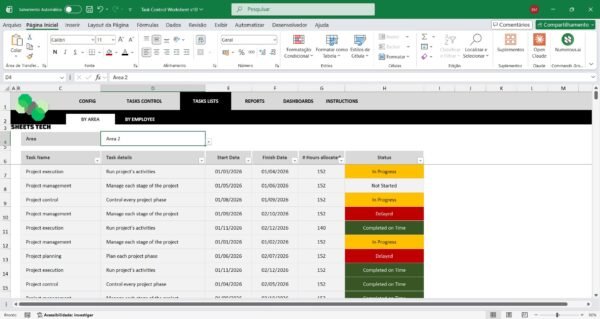
Managing tasks efficiently is a challenge many face daily. If you’re searching for a way to streamline your task management, a Task Control Excel Spreadsheet Template might be the solution you need. This powerful tool can help you organize tasks, prioritize effectively, and enhance productivity.
Why You Need a Task Control Excel Spreadsheet Template
A Task Control Excel Spreadsheet Template is more than just a simple list. It offers a structured approach to task management, allowing you to:
- Organize and Prioritize: Easily categorize tasks by priority and deadline.
- Visualize Progress: Track task completion and visualize progress with charts.
- Enhance Accountability: Assign tasks and monitor accountability within teams.
Common Task Management Challenges
Many people struggle with balancing multiple tasks, leading to stress and inefficiency. Common issues include:
- Lack of Organization: Without a clear system, tasks often fall through the cracks.
- Procrastination: Difficulty in prioritizing tasks can lead to procrastination.
- Ineffective Communication: Team projects suffer when task responsibilities are unclear.
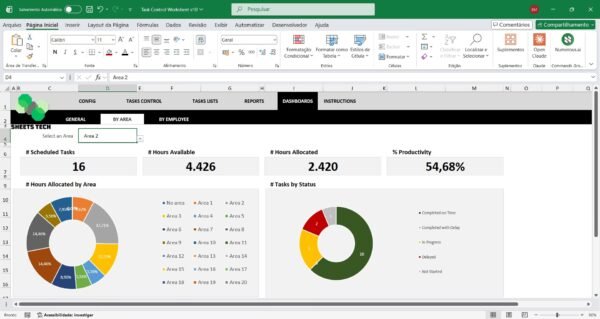
The Solution: SheetsTech Task Control Spreadsheet
The Task Control Excel Spreadsheet Template from SheetsTech is designed to tackle these challenges head-on. Here’s why it’s the ideal tool:
- Comprehensive Dashboard: View all tasks at a glance, ensuring nothing is missed.
- Customizable Fields: Tailor the spreadsheet to fit your specific needs and workflow.
- User-Friendly Interface: Intuitive design makes it easy for anyone to use.
Explore the complete tool to see how it can transform your task management approach.
How to Use the Task Control Spreadsheet
- Input Your Tasks: Start by listing all tasks, including deadlines and responsible parties.
- Set Priorities: Use priority markers to identify urgent tasks.
- Track Progress: Update the spreadsheet regularly to reflect completed tasks and progress.
For a detailed guide, download the spreadsheet and start streamlining your workflow today.
Benefits of Using a Task Control Template
- Increased Efficiency: Spend less time managing tasks and more time completing them.
- Improved Focus: Clear visibility of priorities helps you focus on what’s important.
- Team Coordination: Enhance collaboration with transparent task assignments.
FAQ
Q: Can I customize the template for my business needs?
A: Yes, the Task Control Excel Spreadsheet Template is fully customizable.
Q: Is it compatible with other office software?
A: The template is designed for Excel but can be adapted for other spreadsheet programs.
Conclusion
In conclusion, a Task Control Excel Spreadsheet Template can drastically improve your task management process. By organizing tasks effectively, you save time and reduce stress. To start optimizing your workflow, view the template and see the difference it can make in your daily operations.
See Also:
Boost your results with these other tools: – Inventory Management Excel Spreadsheet Template – Fuel Control Worksheet Excel Template – 5W2H Action Plan Spreadsheet