Keeping track of document expiration dates can be a daunting task, especially when you have numerous files to manage. An Excel Document Expiration Template is a powerful solution that can help you organize and remind you of impending deadlines, ensuring you never miss a crucial date. In this article, we’ll explore the benefits of using an expiration template and how it can streamline your document management process.
Understanding the Importance of Document Expiration
Managing document expiration dates is critical for both personal and professional settings. Missing an expiration date can lead to a host of issues, including:

- Legal consequences due to expired contracts.
- Financial losses from outdated insurance policies.
- Inefficiencies caused by non-renewed licenses or certifications.
Common Challenges in Managing Expiration Dates
Many people struggle with:
- Overlooking important dates due to lack of centralization.
- Forgetting to renew documents because of manual tracking.
- Miscommunication among team members about shared responsibilities.
Streamlining Document Management with Excel
Excel is a versatile tool that can simplify the process of tracking document expirations. With the right template, you can:
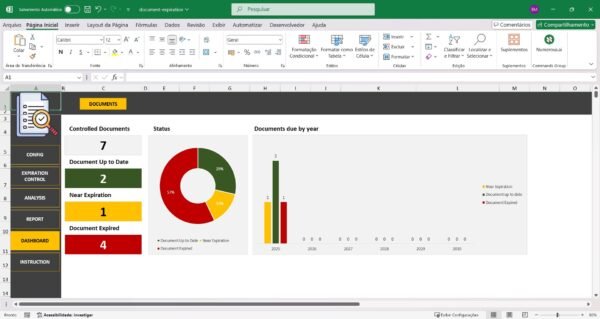
- Centralize Information: Keep all expiration dates in one place.
- Automate Reminders: Set alerts to notify you of upcoming renewals.
- Enhance Collaboration: Share the document with your team to ensure everyone is informed.
The Solution: SheetsTech Excel Expiration Template
To effectively manage document expirations, SheetsTech offers an Excel Document Expiration Template designed to make your life easier. This tool is:
- User-Friendly: Easy to use, even for those with limited Excel experience.
- Comprehensive: Includes fields for document names, expiration dates, and renewal alerts.
- Customizable: Tailor the template to fit your specific needs.
By using this complete tool, you can significantly reduce the risk of missing important deadlines and improve your organizational efficiency.
Benefits of Using the SheetsTech Template
- Time-Saving: Automate reminders and reduce manual tracking.
- Increased Accuracy: Minimize human errors with a structured format.
- Enhanced Productivity: Focus on core tasks without the worry of missing deadlines.
Frequently Asked Questions
How do I set up alerts in the template?
The template includes step-by-step instructions on setting up alerts for document renewals.
Can I customize the template for different types of documents?
Yes, the template is fully customizable, allowing you to adjust fields according to your document types and requirements.
Conclusion
Tracking document expiration dates doesn’t have to be stressful. With the Excel Document Expiration Template from SheetsTech, you can manage your documents efficiently and never miss another deadline. Ready to get started? Download the spreadsheet today and take control of your document management.
See Also
Boost your results with these other tools: